使用jadx-ai-mcp辅助分析某校园pro校园跑

介绍

笔者的学校又开始了新一轮的校园跑 这次换了一个校园跑的app

本着科技强国的思想 自然少不了对这个app的一顿研究

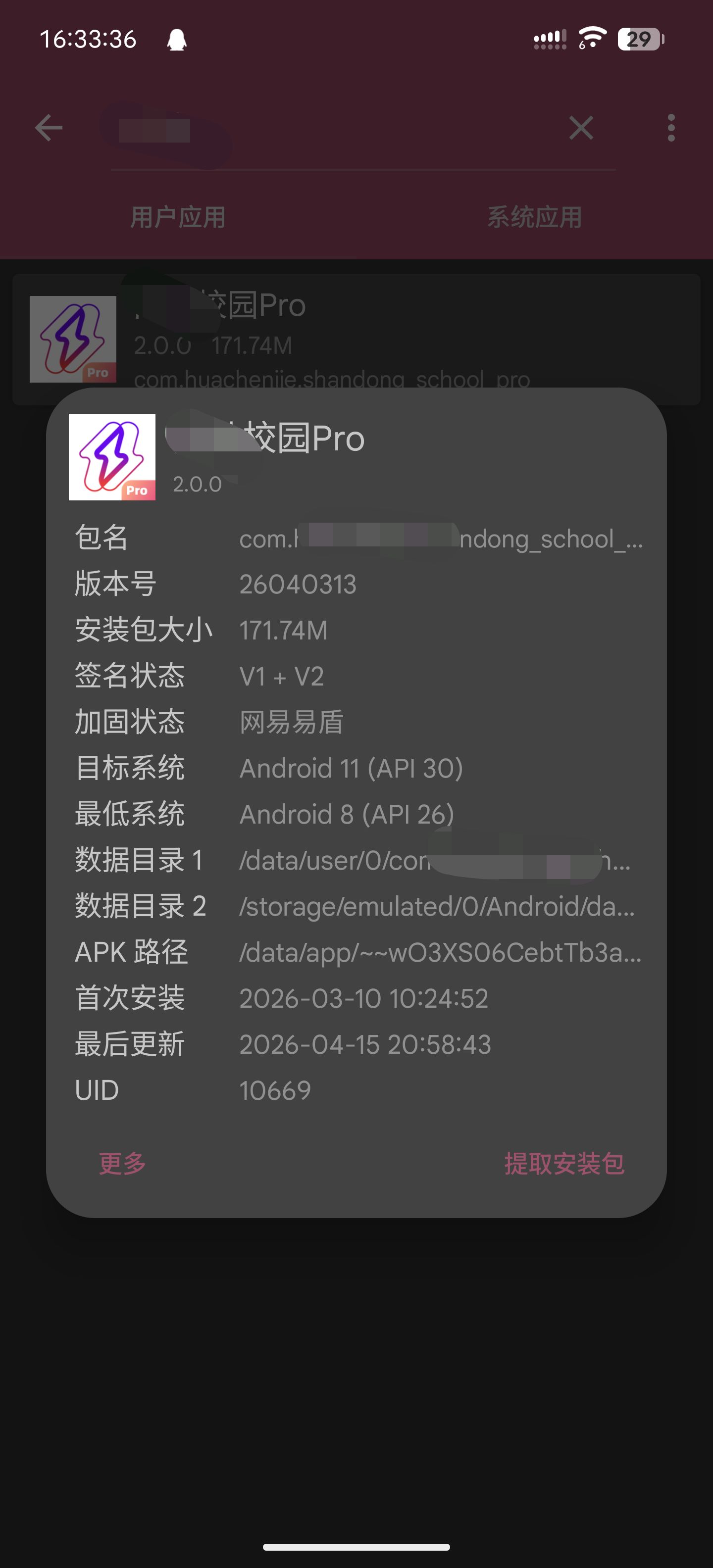
这是一张图片

易盾加固 所以我们直接搞个Xposed模块来hook 是比较省时省力的方法

分析与Hook

首先脱壳 这里就不赘述了 现有的工具很多

这里讲一下如何配置jadx-ai-mcp插件和服务器

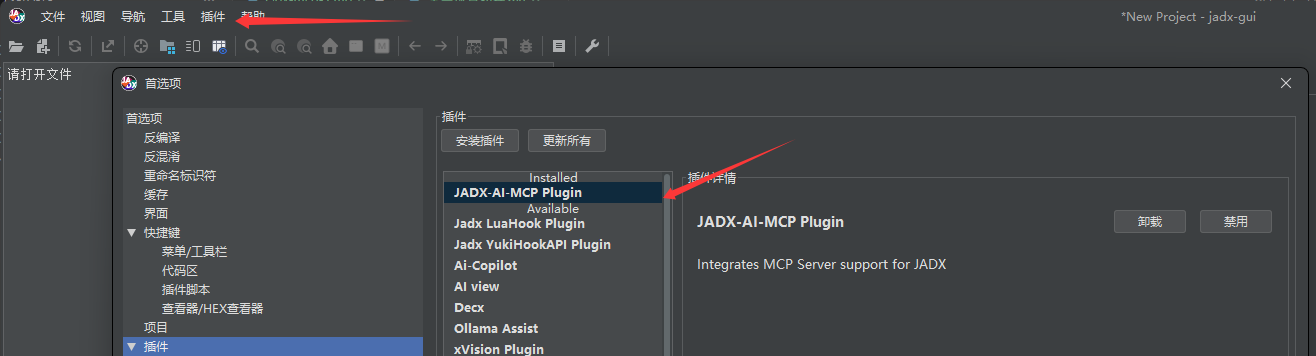
首先打开jadx 加载插件jadx-ai-mcp-6.3.0.jar

这是一张图片

然后解压jadx-mcp-server-6.3.0.zip 命令行进入jadx-mcp-server文件夹

执行

1
pip install -r ./requirements.txt

来安装依赖

然后进入各种支持mcp的编辑器 我这里用的vscode

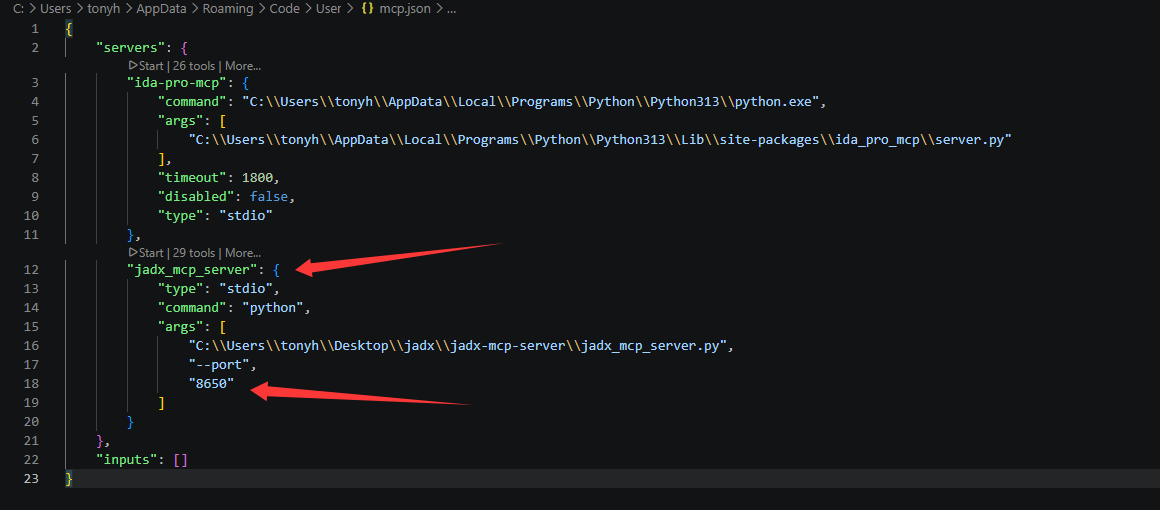
编辑mcp配置 添加刚才的服务器

这是一张图片

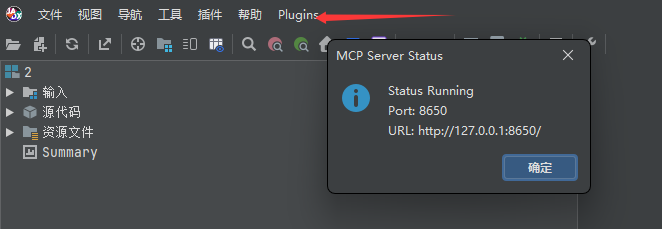
这里的端口要和jadx插件里的端口一致

这是一张图片

这里有个坑 有的时候打开了文件 但是界面上没有Plugins的选项

解决方法是把jadx窗口最大化一下就好了

将这个服务器启用 然后你就可以让agent来调用了

我这里用的是GitHub Copilot

模型推荐使用Gemini 3.1 Pro Claude太贵 GPT限制太多

确认需求

在详细分析之前 先确定好我们的目标

  1. 使用大多数模拟位置的软件模拟位置后 这个app仍然会获取到真实位置信息

  2. 在进行校园跑的过程中 app会随机进行扫脸验证

  3. 校园跑有“电子围栏”机制 在电子围栏外的操作全部不会记录

创建一个Xposed项目

创建模块这里不详细写了 对于这种有加固的app 我们需要获取到app真正加载的ClassLoader来进行hook操作

1
2
3
4
5
6
7
8
9
10
11
12
13
14
15
16
17
18
19
public class StartHook implements IXposedHookLoadPackage {
@Override
public void handleLoadPackage(XC_LoadPackage.LoadPackageParam loadPackageParam) throws Throwable {
String packageName = loadPackageParam.packageName;
ClassLoader classLoader = loadPackageParam.classLoader;
if (packageName.equals("com.huachenjie.shandong_school_pro")) {
XposedHelpers.findAndHookMethod("com.netease.nis.wrapper.MyApplication", loadPackageParam.classLoader,
"attachBaseContext", Context.class, new XC_MethodHook() {
@Override
protected void afterHookedMethod(MethodHookParam param) throws Throwable {
super.afterHookedMethod(param);
Context context = (Context) param.args[0];
ClassLoader classLoader = context.getClassLoader(); //使用这个ClassLoader来进行Hook
Toast.makeText(context, "Hook成功", Toast.LENGTH_SHORT).show();
}
});
}
}
}

信息获取

我们需要获取一次真实的上传数据 用于分析校园跑在跑步的过程中需要记录什么信息

获取到校园跑Activity之后 直接扔给ai分析

ai写出了以下的代码

1
2
3
4
5
6
7
8
9
10
11
12
13
14
15
16
17
18
19
20
21
22
23
24
25
26
27
28
29
30
31
32
33
34
35
36
37
38
39
40
41
42
43
44
45
46
47
48
49
50
51
52
53
54
55
56
57
58
59
60
61
public class RunDataLoggerHook {
public static void Hook(ClassLoader classLoader) {
try {
// 定位到最终负责上传各个成绩请求的入口类
Class<?> runModelClass = XposedHelpers.findClassIfExists("com.huachenjie.running.model.b", classLoader);

if (runModelClass != null) {
// Hook 跑步结束上传成绩的方法 c(Map<String, Object> params)
XposedBridge.hookAllMethods(runModelClass, "c", new XC_MethodHook() {
@Override
protected void beforeHookedMethod(MethodHookParam param) throws Throwable {
super.beforeHookedMethod(param);

if (param.args != null && param.args.length > 0 && param.args[0] instanceof Map) {
Map<?, ?> paramsMap = (Map<?, ?>) param.args[0];

XposedBridge.log("====== 拦截到准备上传的真实跑步数据 ======");

// 尝试使用 Fastjson(应用内自带)将 Map 转为 JSON,方便阅读和复制
try {
Class<?> jsonClass = XposedHelpers.findClassIfExists("com.alibaba.fastjson.JSON", classLoader);
if (jsonClass != null) {
String jsonString = (String) XposedHelpers.callStaticMethod(jsonClass, "toJSONString", paramsMap);
// 分段打印,防止 logcat 截断
logLongString(jsonString);
} else {
// 退级:直接 toString()
logLongString(paramsMap.toString());
}
} catch (Exception e) {
XposedBridge.log("转 JSON 出错: " + e.getMessage());
logLongString(paramsMap.toString());
}

XposedBridge.log("====== 真跑数据拦截结束 ======");
}
}
});
}
} catch (Exception e) {
XposedBridge.log("RunDataLoggerHook 异常: " + e.getMessage());
}
}

// 处理超长字符串的打印(Xposed log 最大长度有硬性限制,通常4k)
private static void logLongString(String str) {
if (str == null) return;
int segmentSize = 3000;
long length = str.length();
if (length <= segmentSize) {
XposedBridge.log(str);
} else {
XposedBridge.log("数据过长,分段打印开始:");
for (int i = 0; i < length; i += segmentSize) {
int end = (i + segmentSize) < length ? (i + segmentSize) : (int) length;
XposedBridge.log(str.substring(i, end));
}
XposedBridge.log("分段打印结束。");
}
}
}

然后我们正常进行一次校园跑 让模块把上传的数据读取出来

1
[ 2026-04-13T07:24:38.626    10669: 17896: 26737 I/LSPosedFramework ] (com.huachenjie.shandong_school_pro)[com.th7.shandong,XposedBridge] {"pauseTimes":5,"stepInterval":18,"distance":"1209","sportType":1,"totalStep":"1822","alignType":3,"stepList":[{"endStep":1606,"endTime":630,"index":31,"stability":0,"startStep":1641,"startTime":600,"step":45,"time":20},{"endStep":1770,"endTime":540,"index":32,"stability":0,"startStep":1710,"startTime":620,"step":54,"time":20},{"endStep":1806,"endTime":658,"index":33,"stability":0,"startStep":1760,"startTime":540,"step":48,"time":20}],"runRecordCode":"2604**6","duration":"658","paceList":[{"distance":45,"endDistance":1199,"endStepCount":1798,"endTime":653,"index":25,"stability":0,"startDistance":1151,"startStepCount":1724,"startTime":626,"stepCount":74,"time":20},{"distance":10,"endDistance":1206,"endStepCount":1816,"endTime":658,"index":26,"stability":0,"startDistance":1199,"startStepCount":1798,"startTime":653,"stepCount":8,"time":3}],"paceInterval":50,"pauseCount":1,"pois":[{"accuracy":3.0,"collectTime":xxx,"createTime":xxx,"index":220,"lat":3xxx,"lng":10xxx,"offFenceDisM":-1,"runTime":656,"satellites":15,"state":1}],"faceCheckRecordList":[{"checkDistance":1169,"checkIndex":1,"checkLat":3xxx,"checkLng":10xxx,"confidence":7xxx,"extendParam":"{\"filePath\":\"/data/user/0/com.huachenjie.shandong_school_pro/files/xxx.jpg\",\"fileUrl\":\"https://oss-cdn.huachenjie.com/prod/run-front/face/run/xxx.jpg\",\"progress\":\"uploading-\\u003esuccess-\\u003ecompare-\\u003esuccess\"}","faceRequestId":"xxx","finishFaceCheck":true,"hasChecked":true,"popTime":xxx,"randomDistance":1169,"runFaceImg":"https://oss-cdn.huachenjie.com/prod/run-front/face/run/xxx.jpg","runFaceUpload":true,"stability":0}],"status":1}

以上数据为瞎编的

逆向

我们把数据发给ai 并且把我们的目标也加上

经过半个小时的分析 ai给出了如下代码

1
2
3
4
5
6
7
8
9
10
11
12
13
14
15
16
17
18
19
20
21
22
23
24
25
26
27
28
29
30
31
32
33
34
35
36
37
38
39
public class FaceBypassHook {
public static void Hook(ClassLoader classLoader) {
Class<?> delegateClass = XposedHelpers.findClassIfExists(
"com.huachenjie.base.aliyun.detect_face.DetectFaceDelegate",
classLoader);

if (delegateClass != null) {
XposedBridge.hookAllMethods(delegateClass, "r", new XC_MethodHook() {
@Override
protected void beforeHookedMethod(MethodHookParam param) throws Throwable {
param.args[0] = true;
XposedBridge.log("Hooked DetectFaceDelegate.r -> 强制修改返回结果为 true");
}
});

/* (可选) 拦截上传对比方法,直接不执行网络请求并调用 r(true)
XposedBridge.hookAllMethods(delegateClass, "o", new XC_MethodReplacement() {
@Override
protected Object replaceHookedMethod(MethodHookParam param) throws Throwable {
XposedBridge.log("Hooked DetectFaceDelegate.o -> 拦截 compareFace 阻断上传");
// 反射调用 r(true) 制造成功假象
XposedHelpers.callMethod(param.thisObject, "r", true);
return null;
}
});
*/

XposedBridge.hookAllMethods(delegateClass, "p", new XC_MethodReplacement() {
@Override
protected Object replaceHookedMethod(MethodHookParam param) throws Throwable {
XposedBridge.log("Hooked DetectFaceDelegate.p -> 拦截 detectLivingFace 阻断活体检验");
// 反射调用 r(true) 制造成功假象
XposedHelpers.callMethod(param.thisObject, "r", true);
return null;
}
});
}
}
}

很搞笑的一点是 这个app的人脸检测是本地判断的

而且只判断了是否存在活体

经过测试 就算直接上传一个只有1x1像素的jpg图片也可以通过校验

1
2
3
4
5
6
7
8
9
10
11
12
13
14
15
16
17
18
19
20
21
22
23
24
25
26
27
28
29
30
31
32
33
34
35
36
37
38
39
40
41
42
43
44
45
46
47
48
49
50
51
52
53
54
55
56
57
58
59
60
61
62
63
64
65
66
67
68
69
70
71
72
73
74
75
76
77
78
79
80
81
82
83
84
85
86
87
88
89
90
91
92
93
94
95
96
97
98
99
100
101
102
103
104
105
106
107
108
109
110
111
112
113
114
115
116
117
118
119
120
121
122
123
124
125
126
127
128
129
130
131
132
133
134
135
136
137
138
139
140
141
142
143
144
145
146
147
148
149
150
151
152
153
154
155
156
157
158
159
160
161
162
163
164
165
166
167
168
169
170
171
172
173
174
175
176
177
178
179
180
181
182
183
184
185
186
187
188
189
190
191
192
193
194
195
public class AntiDetectHook {
public static void Hook(ClassLoader classLoader) {
try {
// 1. 绕过虚拟定位检测
// 屏蔽 Android 6.0+ 的 isFromMockProvider API
XposedHelpers.findAndHookMethod(Location.class, "isFromMockProvider", XC_MethodReplacement.returnConstant(false));

// 屏蔽 Android 12+ 的 isMock API
if (Build.VERSION.SDK_INT >= 31) {
XposedHelpers.findAndHookMethod(Location.class, "isMock", XC_MethodReplacement.returnConstant(false));
}

// 拦截获取开发者选项中“允许模拟位置”的设置读取
XposedHelpers.findAndHookMethod(Settings.Secure.class, "getInt", android.content.ContentResolver.class, String.class, int.class, new XC_MethodHook() {
@Override
protected void beforeHookedMethod(MethodHookParam param) throws Throwable {
String setting = (String) param.args[1];
if (Settings.Secure.ALLOW_MOCK_LOCATION.equals(setting)) {
param.setResult(0); // 强制返回 0(未开启)
}
}
});

// 过滤系统级原始定位上报的网络基站位置,强制只收受虚拟的 GPS
try {
XposedHelpers.findAndHookMethod("android.location.LocationManager", classLoader, "requestLocationUpdates", String.class, long.class, float.class, "android.location.LocationListener", new XC_MethodHook() {
@Override
protected void beforeHookedMethod(MethodHookParam param) throws Throwable {
String provider = (String) param.args[0];
if ("network".equals(provider)) {
// 遇到获取网络定位,直接将其篡改为无效,强迫系统/APP仅用我们注入的 GPS 数据
param.args[0] = "passive";
}
}
});

XposedHelpers.findAndHookMethod("android.location.LocationManager", classLoader, "getLastKnownLocation", String.class, new XC_MethodHook() {
@Override
protected void afterHookedMethod(MethodHookParam param) throws Throwable {
// 抑制“上一次所在位置”的提取。由于这个值常常是你未修改坐标前的真实宿舍点位,跳跃到操场会被算出几十公里而越界
param.setResult(null);
}
});
} catch (Throwable ignore) {}

try { // 新增:拦截高德地图定位的配置设置,强制限制它只使用设备传感器(纯 GPS),切断 Wi-Fi 和基站网络定位,防止“真假坐标互跳”
Class<?> aMapLocationClientOptionClass = XposedHelpers.findClassIfExists("com.amap.api.location.AMapLocationClientOption", classLoader);
if (aMapLocationClientOptionClass != null) {
Class<?> aMapLocationModeEnum = XposedHelpers.findClassIfExists("com.amap.api.location.AMapLocationClientOption$AMapLocationMode", classLoader);
if (aMapLocationModeEnum != null) {
try {
final Object deviceSensorsMode = Enum.valueOf((Class<Enum>) aMapLocationModeEnum, "Device_Sensors");
XposedBridge.hookAllMethods(aMapLocationClientOptionClass, "setLocationMode", new XC_MethodHook() {
@Override
protected void beforeHookedMethod(MethodHookParam param) throws Throwable {
if (deviceSensorsMode != null) {
param.args[0] = deviceSensorsMode; // 强制指定成纯 GPS 模式
}
}
});
} catch (Throwable t) {}
}
}
// 深度拦截高德地图 (AMap) SDK 以及自有封装业务对定位的真实坐标校验,从而绕过“已离开有效跑步范围/公里数0”的警告
Class<?> aMapLocationClass = XposedHelpers.findClassIfExists("com.amap.api.location.AMapLocation", classLoader);
if (aMapLocationClass != null) {
XposedBridge.hookAllMethods(aMapLocationClass, "isMock", XC_MethodReplacement.returnConstant(false));
XposedBridge.hookAllMethods(aMapLocationClass, "getTrustedLevel", XC_MethodReplacement.returnConstant(1));
XposedBridge.hookAllMethods(aMapLocationClass, "getErrorCode", XC_MethodReplacement.returnConstant(0));
// [新增] 屏蔽卫星颗数和定位质量监测
XposedBridge.hookAllMethods(aMapLocationClass, "getSatellites", XC_MethodReplacement.returnConstant(12)); // 强行拉高卫星数,过检测 (>2颗)
XposedBridge.hookAllMethods(aMapLocationClass, "getLocationType", XC_MethodReplacement.returnConstant(1)); // 1 代表原生 GPS 定位返回结果
XposedBridge.hookAllMethods(aMapLocationClass, "getAccuracy", XC_MethodReplacement.returnConstant(5.0f)); // 精度拉高到 5米 绝佳状态
XposedBridge.hookAllMethods(aMapLocationClass, "getSpeed", new XC_MethodHook() {
@Override
protected void afterHookedMethod(MethodHookParam param) throws Throwable {
float speed = (float) param.getResult();
if (speed <= 0.5f) {
param.setResult(2.5f); // 补2.5的底层配速防止被当作静止
}
}
}); }

Class<?> hcjAddressInfo = XposedHelpers.findClassIfExists("huachenjie.sdk.map.lib_base.HCJAddressInfo", classLoader);
if (hcjAddressInfo != null) {
XposedBridge.hookAllMethods(hcjAddressInfo, "isMock", XC_MethodReplacement.returnConstant(false));
XposedBridge.hookAllMethods(hcjAddressInfo, "getSatellites", XC_MethodReplacement.returnConstant(12));
XposedBridge.hookAllMethods(hcjAddressInfo, "getGpsStatus", XC_MethodReplacement.returnConstant(1));
XposedBridge.hookAllMethods(hcjAddressInfo, "getAccuracy", XC_MethodReplacement.returnConstant(5.0f));
XposedBridge.hookAllMethods(hcjAddressInfo, "getSpeed", new XC_MethodHook() {
@Override
protected void afterHookedMethod(MethodHookParam param) throws Throwable {
float speed = (float) param.getResult();
if (speed <= 0.5f) {
param.setResult(2.5f);
}
}
});
}

// 拦截应用层自身纪录点的对象
Class<?> runLatLng = XposedHelpers.findClassIfExists("com.huachenjie.common.bean.RunLatLng", classLoader);
if (runLatLng != null) {
XposedBridge.hookAllMethods(runLatLng, "getSatellites", XC_MethodReplacement.returnConstant(12));
XposedBridge.hookAllMethods(runLatLng, "isValid", XC_MethodReplacement.returnConstant(true));
XposedBridge.hookAllMethods(runLatLng, "getAccuracy", XC_MethodReplacement.returnConstant(5.0f));
}

// 核心控制层:接管 DataComponent 新版拉取位置信息的方法 P0 (原为O0)
Class<?> dataComponent = XposedHelpers.findClassIfExists("com.huachenjie.running.service.DataComponent", classLoader);
if (dataComponent != null) {
XposedBridge.hookAllMethods(dataComponent, "P0", new XC_MethodHook() {
@Override
protected void afterHookedMethod(MethodHookParam param) throws Throwable {
Object hcjInfo = param.getResult();
if (hcjInfo != null) {
XposedHelpers.callMethod(hcjInfo, "setSatellites", 12);
XposedHelpers.callMethod(hcjInfo, "setMock", false);
XposedHelpers.callMethod(hcjInfo, "setFromMockProvider", false);
XposedHelpers.callMethod(hcjInfo, "setAccuracy", 5.0f);
XposedHelpers.callMethod(hcjInfo, "setGpsStatus", 1); // 设置 GPS 状态

float speed = (float) XposedHelpers.callMethod(hcjInfo, "getSpeed");
if (speed <= 0.5f) {
XposedHelpers.callMethod(hcjInfo, "setSpeed", 2.5f);
}
}
}
});
}

// 【强制屏蔽地理围栏逻辑检测】如果上层仍然通过缓存的目标点(TargetPoints)判断你在围栏外,这里进行拦截
Class<?> targetPointsClass = XposedHelpers.findClassIfExists("com.huachenjie.common.bean.TargetPoints", classLoader);
if (targetPointsClass != null) {
XposedBridge.hookAllMethods(targetPointsClass, "isInFence", XC_MethodReplacement.returnConstant(true));
XposedBridge.hookAllMethods(targetPointsClass, "getIsInFence", XC_MethodReplacement.returnConstant(true));
XposedBridge.hookAllMethods(targetPointsClass, "isSensitiveFenceAdded", XC_MethodReplacement.returnConstant(false));
XposedBridge.hookAllMethods(targetPointsClass, "getIsSensitiveFenceAdded", XC_MethodReplacement.returnConstant(false));
}

// 阻止 AutoPauseView 弹窗本身显示“越界”和 WIfi 报警,掩耳盗铃
Class<?> autoPauseView = XposedHelpers.findClassIfExists("com.huachenjie.running.widget.AutoPauseView", classLoader);
if (autoPauseView != null) {
XposedBridge.hookAllMethods(autoPauseView, "setLastedDuration", new XC_MethodHook() {
@Override
protected void beforeHookedMethod(MethodHookParam param) throws Throwable {
int reason = (int) param.args[1];
// 去除 1 (越野报警) 和 2 (WiFi预警) 等相关的标志
param.args[1] = reason & ~3;
}
});
}
} catch (Throwable ignore) {}


// [新增] Android原生地层级检测:卫星获取接口拦截,处理 GnssStatus/GpsStatus 检测不到卫星导致为0的问题
try {
Class<?> gnssStatusClass = XposedHelpers.findClassIfExists("android.location.GnssStatus", classLoader);
if (gnssStatusClass != null) {
XposedBridge.hookAllMethods(gnssStatusClass, "getSatelliteCount", XC_MethodReplacement.returnConstant(12));
}
} catch (Throwable ignore) {}

// 拦截底层系统本身 Location 附加数据的卫星情况
XposedHelpers.findAndHookMethod(Location.class, "getExtras", new XC_MethodHook() {
@Override
protected void afterHookedMethod(MethodHookParam param) throws Throwable {
android.os.Bundle extras = (android.os.Bundle) param.getResult();
if (extras == null) {
extras = new android.os.Bundle();
}
extras.putInt("satellites", 12);
param.setResult(extras);
}
});


// 2. 绕过基本的 Root 检测(隐藏常见的su执行文件)
XposedHelpers.findAndHookMethod(File.class, "exists", new XC_MethodHook() {
@Override
protected void beforeHookedMethod(MethodHookParam param) throws Throwable {
File file = (File) param.thisObject;
String path = file.getAbsolutePath();
if (path != null && (path.endsWith("/su") || path.contains("magisk") || path.contains("xposed"))) {
param.setResult(false); //笔者: 这玩意真的有用吗(不是)
}
}
});

XposedBridge.log("★[XXXX校园] 防检测机制(Root/虚拟定位)Hook 成功");
} catch (Throwable t) {
XposedBridge.log("★[XXXX校园] 防检测机制 Hook 异常: " + t.getMessage());
}
}
}

我们乘胜追击 让步频模拟等功能也一并实现

1
2
3
4
5
6
7
8
9
10
11
12
13
14
15
16
17
18
19
20
21
22
23
24
25
26
27
28
29
30
31
32
33
34
35
36
37
38
39
40
41
42
43
44
45
46
47
48
49
50
51
52
53
54
55
56
57
58
59
60
61
62
63
64
65
66
67
68
69
70
71
72
73
74
public class SensorMockHook {
private static int mockStepCount = 0;
private static Timer stepTimer = null;

public static void Hook(ClassLoader classLoader) {
try {
// 拦截注册传感器监听器,捕获App对步数和加速度传感器的监听
XposedHelpers.findAndHookMethod(SensorManager.class, "registerListener",
SensorEventListener.class, Sensor.class, int.class, new XC_MethodHook() {
@Override
protected void afterHookedMethod(MethodHookParam param) throws Throwable {
SensorEventListener listener = (SensorEventListener) param.args[0];
Sensor sensor = (Sensor) param.args[1];

if (sensor == null || listener == null) return;

int type = sensor.getType();
// 针对计步器和计步检测器进行模拟
if (type == Sensor.TYPE_STEP_COUNTER || type == Sensor.TYPE_STEP_DETECTOR) {
XposedBridge.log("★[XXXX校园] 拦截到步数传感器注册开始模拟步频");
startStepSimulation(listener, sensor);
}
}
});

XposedHelpers.findAndHookMethod(SensorManager.class, "unregisterListener",
SensorEventListener.class, Sensor.class, new XC_MethodHook() {
@Override
protected void afterHookedMethod(MethodHookParam param) throws Throwable {
stopStepSimulation();
}
});
XposedBridge.log("★[XXXX校园] 步频模拟机制 Hook 成功");
} catch (Throwable t) {
XposedBridge.log("★[XXXX校园] 传感器步频模拟 Hook 异常: " + t.getMessage());
}
}

private static void startStepSimulation(final SensorEventListener listener, final Sensor sensor) {
if (stepTimer != null) return;
stepTimer = new Timer();
// 模拟正常跑步步频:约每秒 2.5 步 (也就是 150 步/分钟)
stepTimer.scheduleAtFixedRate(new TimerTask() {
@Override
public void run() {
mockStepCount += 2;
sendFakeSensorEvent(listener, sensor, mockStepCount);
}
}, 0, 800);
}

private static void stopStepSimulation() {
if (stepTimer != null) {
stepTimer.cancel();
stepTimer = null;
}
}

// 构造伪造的 SensorEvent 并通知 App
private static void sendFakeSensorEvent(SensorEventListener listener, Sensor sensor, int steps) {
try {
// 通过反射实例化系统保护的 SensorEvent
SensorEvent event = (SensorEvent) SensorEvent.class.getDeclaredConstructors()[0].newInstance(1);
event.sensor = sensor;
event.accuracy = SensorManager.SENSOR_STATUS_ACCURACY_HIGH;
event.timestamp = System.nanoTime();
event.values[0] = steps;

listener.onSensorChanged(event);
} catch (Throwable e) {
// 忽略报错
}
}
}

后续还实现了一些小功能 比如让app获取不到WiFi等功能 这里就不展开了

最后 我们找一个带摇杆/模拟路线的虚拟定位软件就可以愉快地开跑了

总结

AI真是太好用了

遇到问题/解决不了的问题 可以直接带着LSPosed的模块日志和问题现象去问ai 重复几次即可解决


使用jadx-ai-mcp辅助分析某校园pro校园跑
https://www.tonyha7.com/2026/04/16/jadx-mcp-1/
作者
th7
发布于
2026年4月16日
许可协议